Formulas, threads and gathers
Computed properties for your databases. Formulas calculate a value for each note, threads link notes to other notes, and gathers roll values up across a thread.
A computed property is a column that a database works out for you instead of one you type. There are four kinds:
| Kind | What it is | Also known as |
|---|---|---|
| Formula | A value calculated for each note from its other properties | A formula column |
| Thread | Links from each note to other notes | A relation |
| Gather | A value rolled up across a thread, such as a total or the latest date | A rollup |
| Person | A thread to notes about people | A person property |
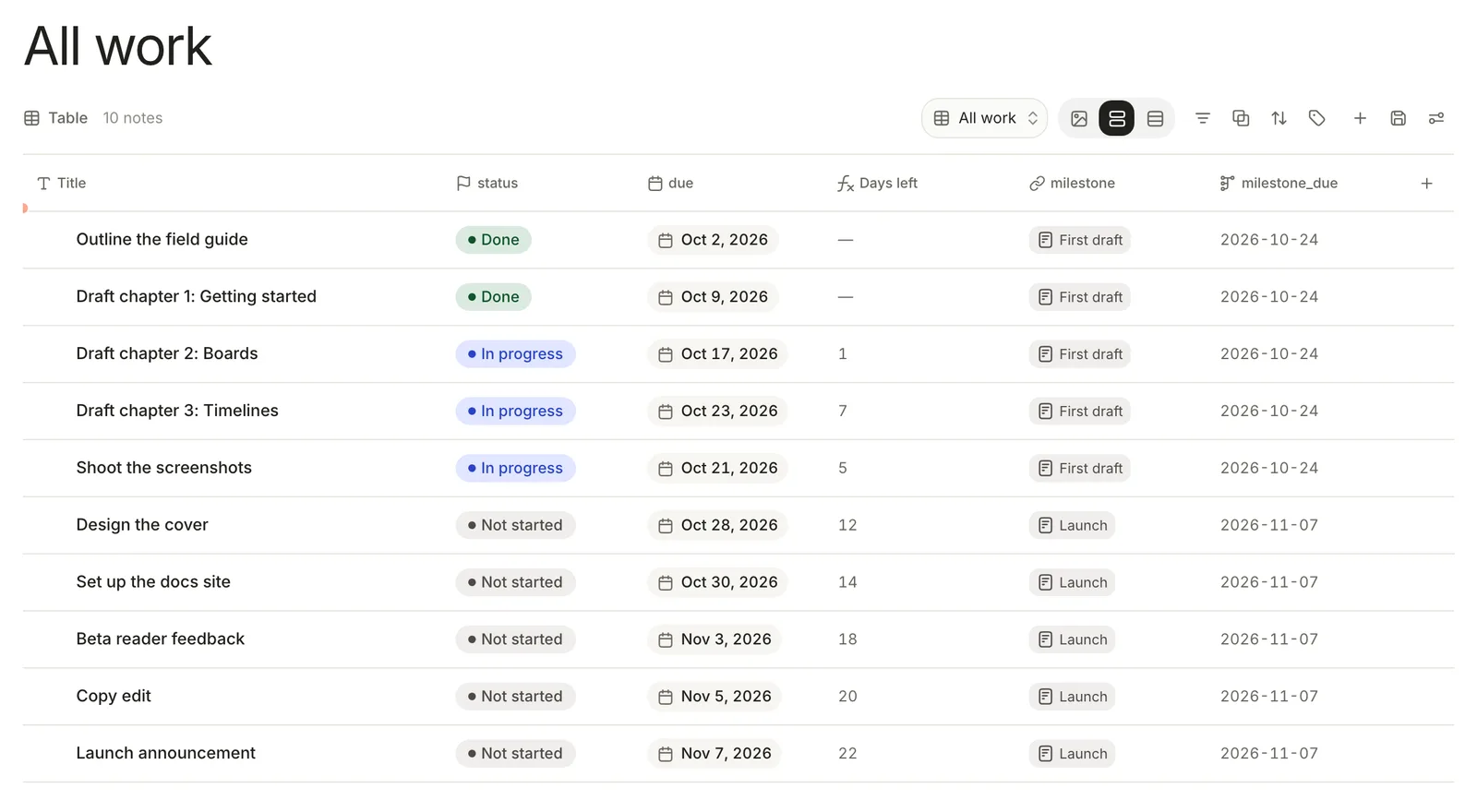
Add a computed property
- Open a database you made, in a Table view.
- Click + (Add property) at the right end of the header row.
- Under Computed, choose Formula, Thread, Gather or Person.
- Type a name where it says
field_name, fill in the definition, and click the check (Add field).
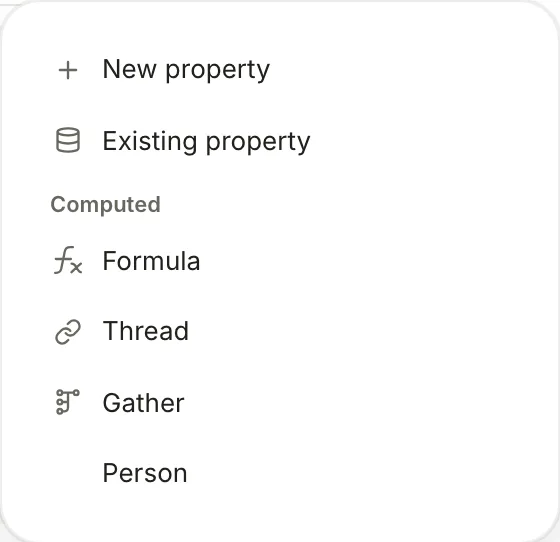
Names are stored in lower case with underscores, so Days left is days_left in formulas. To change a computed property, click its column header; the editor opens with Apply and Remove field. Save to library keeps a copy to reuse in another database, and Load preexisting brings one back.
Computed properties need a database you made; built-ins, folders and tag pages don't offer them. Filters don't offer them yet either, but a chart can add up or average a formula or a gather.
Formulas
A formula is an expression worked out for each row, much like a spreadsheet formula. Refer to a property with @:
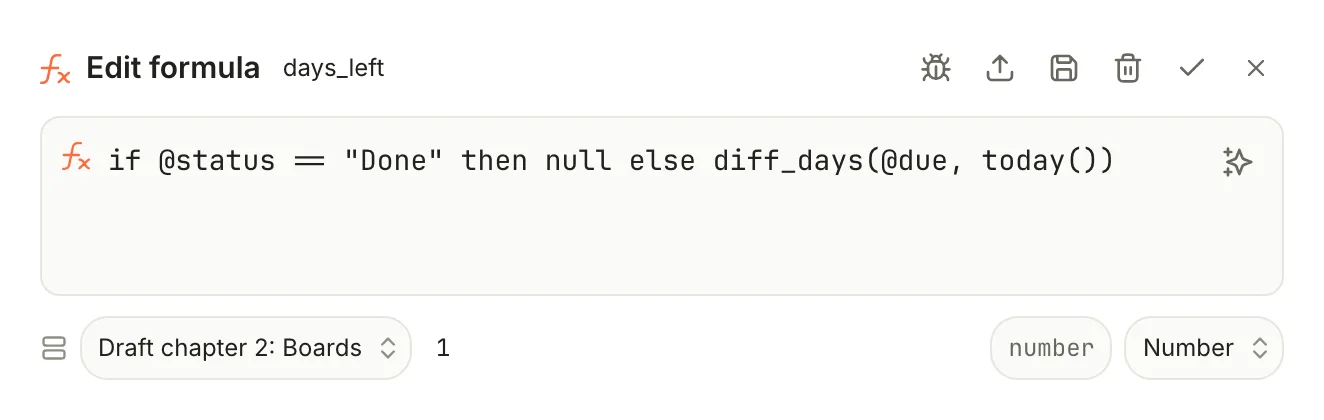
if @status == "Done" then null else diff_days(@due, today())
For Draft chapter 2: Boards, due 2026-10-17, that gives 1 on October 16; for finished items it's empty.
The pieces:
| Write | Means |
|---|---|
@effort | The note's effort property. Use quotes for names with spaces: @"due date". |
@title, @type, @tags, @created, @updated | The note's built-in fields. @tags is a list. |
@days_left | Another computed property on the same database |
@milestone.@due | The due property of every note the milestone thread links to, as a list |
12, "late", true, false, null | A number, text, yes or no, nothing. Text can't contain a ". |
+ - * / % ^ | Arithmetic on numbers. % is the remainder, ^ a power. |
++ | Joins two pieces of text: @owner ++ " (owner)" |
== != | Equal, not equal. Text must match exactly, capitals included. |
< <= > >= | Compare numbers, dates or text |
&& || ! | And, or, not |
a ?? b | a, or b when a is empty |
if … then … else … | Choose between two results. Write it in lower case. |
let x = … in … | Name part of a formula to use it more than once |
Things that trip people up:
- If a property a formula uses is empty, the result is empty, unless you use
==,!=,??orcoalesce(). - Dates written as
YYYY-MM-DDin a property are read as dates, so@due < today()works. Do arithmetic on dates withadd_days()anddiff_days();+and-only take numbers. today()andnow()use UTC.- Function names ignore capitals, except
if: a lower-caseifstartsif … then … else, so write the function form asIF(@effort > 3, "big", "small"). - A formula that can't be worked out for one note shows an error in that cell only.
- Ask AI in the editor writes or fixes a formula from a description, once an AI provider is connected.
Functions
| Kind | Functions |
|---|---|
| Numbers | abs(x), ceil(x), floor(x), round(x) or round(x, places), min(…), max(…), sum(…), average(…), avg(list), median(…) |
| Text | length(t), upper(t), lower(t), slice(t, start, end), contains(t, part), replace(t, find, with), split(t, separator), join(list, separator), regex_match(t, pattern), concat(…) |
| Dates | today(), now(), year(d), month(d), day(d), weekday(d) (Monday is 1), add_days(d, n), diff_days(a, b) (a minus b, in whole days), format(d, pattern), date(t) |
| Logic | IF(test, a, b), not(x), and(…), or(…), coalesce(a, b, …) |
| Conversion | to_number(x), to_string(x), to_date(t), to_bool(x) |
| Lists | count(list), counta(…), unique(list), any(list), all(list) |
contains() and replace() respect capitals. format() takes patterns like "MMM D" (Oct 17) or "YYYY-MM-DD". date() and to_date() need a full timestamp, such as "2026-11-01T00:00:00Z". vlookup, index and match exist for sheets and have nothing to look up in a database.
Threads
A thread links each note to other notes: work items to their milestone, papers to their authors, meetings to a project. Choose how it finds those notes:
- Linked: you pick them. Set Link to one or many, and the notes from anywhere or from one database. A thread that picks from a database gets a picker in its table cells.
- Matched: conditions pick them. Choose the database to Match from, then add conditions as in a filter. In a text condition's value,
@titlestands for the note's own title and@idfor its id, so a Projects database can match every task whoseprojectis@title. Switch notes to blocks to match Sprouts, headings and other blocks inside notes instead of whole notes.
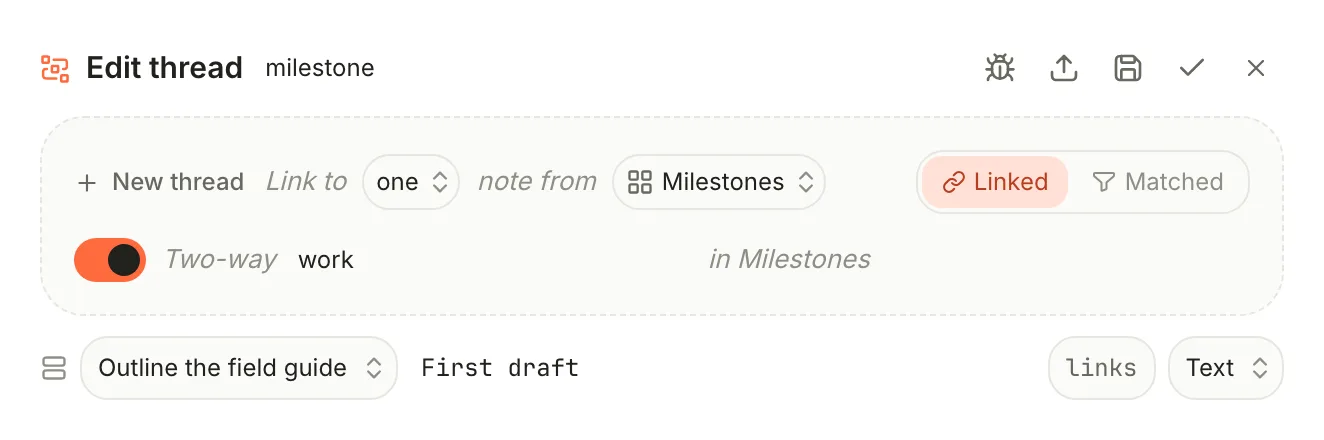
Two-way appears once a thread draws on a database. Switch it on and name the other side: that database gets a column of the notes that point at each of its notes. For a Linked thread you can edit the link from either side; for a Matched one the other side is read-only.
Threads live in your notes. Each note keeps its links under relations: in its properties, by title:
relations:
  milestone: '[[First draft]]'
For a thread to notes anywhere, type the links there yourself. Matched threads write their matches into the same block, refreshed when you open or save the note. The other side of a two-way thread is never written into the other notes; Terra works it out from the links.
Gathers
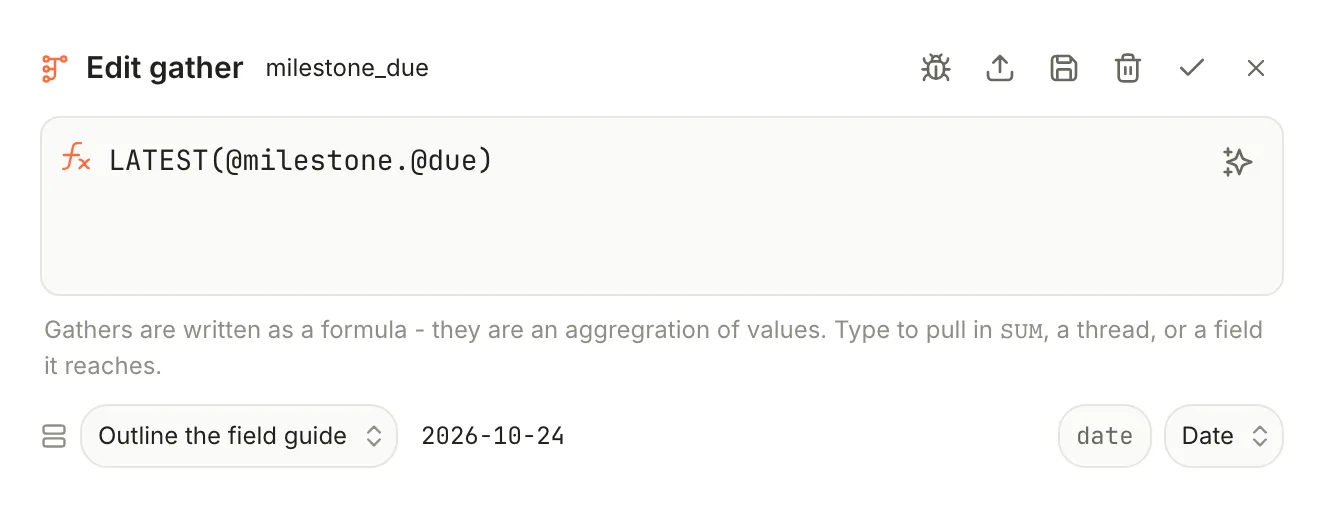
A gather reads through a thread and sums, counts or picks from the linked notes. It needs a thread on the same database first. Write it as one function around a thread and a field:
LATEST(@milestone.@due)
| Function | Gives |
|---|---|
SUM(@thread.@field), AVG(…), MIN(…), MAX(…) | A total, average, smallest or largest number |
COUNT(@thread) | How many notes the thread links to |
EARLIEST(@thread.@field), LATEST(…) | The first or last date |
UNIQUE(@thread.@field) | Each value once, as a list |
CONCAT(@thread.@field) | The values joined with commas |
The field can be any property of the linked notes, or a built-in such as title, created or updated. Notes without a value are skipped. On a Milestones database with a work thread, SUM(@work.@effort) totals each milestone's effort. For anything more, use a formula: @work.@effort there is the list of values, so round(avg(@work.@effort), 1) works.
Person
Person adds a thread called people (then people_2, and so on) to notes whose type is person. Pick people in its table cells; they show as chips with their photos. Click the column header to rename it.
How they're stored
| Kind | Its definition | Its values |
|---|---|---|
| Formula, gather | In the database's file, .terra/databases/<id>.json | Worked out when the view opens; never written to notes |
| Thread, Person | In the database's file | In each note's relations: |
So formulas and gathers belong to their database, and a note shows them only there. For a note that isn't in any database, open its properties, click +, and choose Formula, Thread, Gather or Person: Terra asks which database to Evaluate against, adds the definition to that database, and records the link in the note:
computed:
  days_left: 01JQ8ZB4K2M7X9T3R5V6W8Y0C1
Related
- Databases — where computed properties live.
- Properties — the typed values formulas read.
- Views and layouts — charts that sum a formula or a gather.
- Run a project — threads that roll milestone progress up a timeline.
Was this guide helpful?